Database Schemas
This document describes all database schemas used in the application, including their fields and indexes.
Clients
The clients collections stores infromation about different customers
Schema Fields
| Field | Type | Required | Description |
|---|---|---|---|
_id | String | Yes | Unique client identifier |
code | String | No | Optional client code |
name | String | Yes | Client name |
deleted | Boolean | Yes | Soft delete flag (default: false) |
Branches
The branches collection holds information about the customers' stores
Schema Fields
| Field | Type | Required | Description |
|---|---|---|---|
_id | String | Yes | Unique branch identifier |
clientId | String | Yes | ID of the client this branch belongs to |
code | String | No | Optional branch code |
name | String | Yes | Branch name |
deleted | Boolean | Yes | Soft delete flag (default: false) |
Projects
The projects collection holds data about a stocktaking a store
Schema Fields
| Field | Type | Required | Description |
|---|---|---|---|
_id | String | Yes | Unique project identifier |
branchId | String | Yes | ID of the branch this project belongs to (validated with idRegex) |
teamId | String | No | Team assigned to the project |
teamManagerId | String | No | User ID of the assigned team manager |
projectManagerId | String | No | User ID of the assigned project manager |
code | String | No | Optional project code |
name | String | Yes | Project name |
state | String | Yes | Project state (allowed values: initiated,running,closed,published,archived; default: initiated) |
effectiveDate | Date | No | Effective start date |
startDate | Date | No | Actual start date |
endDate | Date | No | End date (must be later than startDate if both are set) |
closedAt | Date | No | When the project was closed |
misc | Object | Yes | Arbitrary metadata (blackbox, defaults to {}) |
deleted | Boolean | Yes | Soft delete flag (default: false) |
emailProcessed | Boolean | No | Whether email notification about customer deliverables has been sent |
matchDataVerifiedEmailSent | Boolean | No | Whether notification email for invalid customer data was sent |
notPaid | Boolean | No | Indicates if this was a not paid project |
Indexes
deleted+startDate+endDate- Supports queries filtering by active/deleted state and project timeline rangesbranchId- Optimizes lookups of projects belonging to a specific branchdeleted+state+emailProcessed- Supports filtering projects by lifecycle state and email-processing workflow status
Users
The users collection stores user account information and profiles.
Schema Fields
| Field | Type | Required | Description |
|---|---|---|---|
_id | String | Yes | Unique user identifier |
username | String | Yes | Unique username |
emails | Array | No | Array of email objects |
emails[].address | String | Yes | Email address |
emails[].verified | Boolean | Yes | Whether email is verified |
createdAt | Date | Yes | Account creation date |
profile | Object | Yes | User profile information |
profile.firstName | String | No | User's first name |
profile.lastName | String | No | User's last name |
profile.preferedLanguage | String | No | Preferred language (default: 'en') |
profile.birthday | Date | No | User's birthday |
profile.gender | String | No | Gender ('Male' or 'Female') |
profile.organization | String | No | Organization name |
profile.website | String | No | Website URL |
profile.bio | String | No | Biography |
profile.country | Object | No | Country information |
profile.country.name | String | Yes | Country name |
profile.country.code | String | Yes | ISO country code (2 letters) |
profile.misc | Object | No | Miscellaneous profile data |
profile.forceChange | Boolean | No | Force password change flag |
services | Object | No | Authentication services data (blackbox) |
teamIds[string] | Array | No | Array of team IDs the user belongs to |
heartbeat | Date | No | Last activity timestamp |
deleted | Boolean | Yes | Soft delete flag (default: false) |
currentProjectId | String | No | Currently active project ID |
type | String | Yes | User type: 'full' or 'temp' (default: 'full') |
lastLogIn | Date | No | Last login timestamp |
projectId | String | No | Associated project ID for temp users |
Indexes
teamIds- Indexed for querying users by team membershipdeleted+username- Indexed for querying active users by usernameprojectId+username+deleted(partial filter:projectIdexists)- Used for querying users within a specific project
Text Indexes
username+profile.firstName+profile.lastName- Full-text search on user names
Matches
The matches collection stores product match information. Collections are dynamically created per project.
Schema Fields
| Field | Type | Required | Description |
|---|---|---|---|
_id | String | Yes | Unique match identifier |
code | String | Yes | Match code (indexed) |
type | String | Yes | Match type (indexed) |
locationCode | String | No | Location code |
productCode | String | No | Product code |
lotCode | String | No | Lot code |
serialCode | String | No | Serial code |
description | String | No | Product description |
extra1 | String | No | Extra field 1 |
extra2 | String | No | Extra field 2 |
extra3 | String | No | Extra field 3 |
extra4 | String | No | Extra field 4 |
extra5 | String | No | Extra field 5 |
price | Number | Yes | Product price (default: 0) |
message | String | No | Additional message |
alternateCodes | String | No | Alternate product codes |
zoneCode | String | No | Zone code |
division | String | No | Division |
productGroup | String | No | Product group |
batch | Integer | Yes | Batch number (default: 1) |
createdAt | Date | Yes | Creation timestamp (auto-set) |
Note: Documents expire after 15 days (TTL index on createdAt).
Indexes
type+code- Indexed for querying matches by type and codeproductCode+lotCode- Indexed for querying by product and lot
TTL Index
createdAt- Documents expire after 15 days
Scans
The scans collection stores scan records created during zone sessions.
Schema Fields
| Field | Type | Required | Description |
|---|---|---|---|
_id | String | Yes | Unique scan identifier |
sessionId | String | Yes | Current zone session ID |
originalSessionId | String | Yes | Original zone session ID when scan was created |
order | Integer | Yes | Scan order within session |
matchCode | String | Yes | Match code from matches collection |
count | Number | Yes | Quantity scanned |
modifiedAt | Date | Yes | Last modification timestamp |
needsVerification | Boolean | No | Whether scan requires verification |
isVerified | Boolean | Yes | Whether scan has been verified |
addMarkerBelow | Boolean | Yes | Marker placement flag |
verifyReason | String | No | Reason for verification requirement |
match | Object | Yes | Match data from match database (blackbox) |
deleted | Boolean | Yes | Soft delete flag (default: false) |
revisions[object] | Array | No | Revision history array |
projectId | String | Yes | Project ID |
price | Number | No | Price from match |
pieces | Number | No | Number of pieces |
zoneCode | String | No | Zone code |
source | String | No | Scan source |
Indexes
projectId+originalSessionId+order- Indexed for querying scans by project and original sessionprojectId+sessionId+deleted- Indexed for querying scans by current sessionprojectId+deleted+count(descending) - Indexed for querying scans by quantityprojectId+matchCode+deleted- Indexed for querying scans by match codeprojectId+revisions.sessionId- Indexed for querying scans by revision sessionprojectId- General project index
Zones
The zones collection stores zone/work area information.
Schema Fields
| Field | Type | Required | Description |
|---|---|---|---|
_id | String | Yes | Unique zone identifier |
projectId | String | Yes | Project ID (not indexed) |
code | String | Yes | Zone code |
warehouseCode | String | Yes | Warehouse code |
division | String | No | Division |
remarks | String | No | Zone remarks |
errorVerifyFunction | String | No | Verify function error message |
errorTransformScans | String | No | Transform scans error message |
flags[string] | Array | No | Zone flags array |
priority | String | No | Zone priority |
extra1 | String | No | Extra field 1 |
extra2 | String | No | Extra field 2 |
extra3 | String | No | Extra field 3 |
extra4 | String | No | Extra field 4 |
extra5 | String | No | Extra field 5 |
status | String | Yes | Zone status (default: 'undefined') |
deleted | Boolean | Yes | Soft delete flag (default: false) |
scanSessions | Integer | No | Number of scan sessions (auto-updated by hooks) |
isVerified | Boolean | No | Whether zone is verified |
meta | Object | No | Metadata object (blackbox) |
clientZoneCode | String | No | Client-specific zone code |
Status Values:
undefinedscan.plan,scan.busy,scan.readyverify.plan,verify.busy,verify.readyexport.plan,export.busy,export.readyblocked
Indexes
projectId+deleted+code- Indexed for querying zones by project and codeprojectId+deleted+status- Indexed for querying zones by project and status
Zone Sessions
The zoneSessions collection stores session records for scanning, verification, and export operations on zones.
Schema Fields
| Field | Type | Required | Description |
|---|---|---|---|
_id | String | Yes | Unique session identifier |
uuid | String | Yes | Unique session UUID |
zoneId | String | Yes | Zone ID |
type | String | Yes | Session type: 'scan', 'verify', 'zone-verify', 'export', 'change-request' |
deviceCode | String | No | Device code used for session |
createdAt | Date | Yes | Session creation timestamp |
startedAt | Date | No | Session start timestamp |
closedAt | Date | No | Session close timestamp |
userId | String | Yes | User ID who created the session |
flags[string] | Array | No | Session flags array |
busy | Boolean | No | Whether session is currently busy |
deleted | Boolean | Yes | Soft delete flag (default: false) |
projectId | String | Yes | Project ID |
jobId | String | No | Associated job ID (for export sessions) |
revisions[object] | Array | No | Revision history array |
previousZoneId | String | No | Previous zone ID (for moved sessions) |
retryHistory | Array | No | Retry history for zone-verify sessions |
retryHistory[].count | Number | Yes | Retry attempt count |
retryHistory[].createdAt | Date | Yes | Retry timestamp |
count | Number | No | Session count |
Indexes
userId- Indexed for querying sessions by userprojectId+busy- Indexed for querying active/busy sessions by projectprojectId+zoneId+uuid(unique, partial filter:uuidexists) - Indexed for unique session lookupprojectId+userId+closedAt- Indexed for querying user sessions by projectprojectId+zoneId- Indexed for querying sessions by zoneprojectId+deleted+type- Indexed for querying sessions by type (used for statistics)
Registrations
The registrations collection stores user registration information for projects.
Schema Fields
| Field | Type | Required | Description |
|---|---|---|---|
_id | String | Yes | Unique registration identifier |
projectId | String | Yes | Project ID |
username | String | Yes | Username (unique per project) |
password | String | No | Hashed password |
deleted | Boolean | Yes | Soft delete flag (default: false) |
role | String | Yes | Project role (from roles.project enum) |
type | String | Yes | Registration type: 'full' or 'temp' |
isClient | Boolean | Yes | Whether registration is for a client user (default: false) |
firstName | String | No | User's first name |
lastName | String | No | User's last name |
teamIds[string] | Array | No | Array of team IDs |
createdAt | Date | Yes | Registration creation date (default: now) |
modifiedAt | Date | No | Last modification timestamp |
modifiedBy | String | Yes | User ID who last modified |
meta | Object | No | Metadata object (blackbox) |
revisions[object] | Array | No | Revision history array |
Indexes
username- Indexed for querying registrations by username (used by registration jobs)projectId- Indexed for querying registrations by projectprojectId+username(unique) - Indexed for unique username lookup per project
Text Indexes
username+firstName+lastName- Full-text search on registration names
Assets
The assets collection stores file assets (images) associated with projects, branches, clients, or global settings.
Schema Fields
| Field | Type | Required | Description |
|---|---|---|---|
_id | String | Yes | Unique asset identifier |
meta | Object | Yes | Asset metadata |
meta.fileName | String | Yes | Original file name |
meta.objectId | String | No | ID of associated object (project/branch/client) |
meta.objectLevel | String | Yes | Object level: 'projectId', 'branchId', 'clientId', or 'global' |
meta.uploaded_at | Date | Yes | Upload timestamp |
meta.uploaded_by | String | Yes | User ID who uploaded the asset |
Note: This collection uses ostrio:files package. Additional fields are managed by the package (size, type, path, etc.).
Accepted File Types:
image/pngimage/jpgimage/svg+xml
Max File Size: 5 MB
Indexes
meta.objectLevel+meta.objectId- Indexed for querying assets by object level and ID
Stock
The stock collection stores stock/inventory information for projects.
Schema Fields
| Field | Type | Required | Description |
|---|---|---|---|
_id | String | Yes | Unique stock identifier |
projectId | String | Yes | Project ID (indexed) |
match | Object | Yes | Match data object (blackbox) |
expected | Number | Yes | Expected quantity |
actual | Number | Yes | Actual quantity (default: 0) |
zoneIds[string] | Array | No | Array of zone IDs |
verified | Boolean | Yes | Whether stock is verified (default: false) |
difference | Number | Yes | Difference between expected and actual (default: 0) |
differencePrice | Number | Yes | Price difference (default: 0) |
Indexes
projectId- Indexed for querying stock by project
Notes
Index Notation
- Text Indexes: Full-text search indexes for text search operations
- TTL Indexes: Time-to-live indexes that automatically expire documents
Query Performance
When querying collections, use indexed fields in your query filters to ensure optimal performance. Composite indexes support queries that use the indexed fields in the order they appear in the index.
Soft Deletes
Most collections use a deleted boolean field for soft deletes. When querying, you may need to filter by deleted: false to exclude deleted documents, unless you have permission to view deleted items.
Scanner sqlite
Schema Fields
| Field | Type | Required | Description |
|---|---|---|---|
| MatchCode | nvarchar(60) | Yes | Unique match identifier (primary key) |
| Division | nvarchar(250) | No | Division the match belongs to |
| ProductGroup | nvarchar(250) | No | Product group classification |
| LocationCode | nvarchar(30) | No | Store or location identifier |
| ProductCode | nvarchar(60) | No | Product identifier |
| LotCode | nvarchar(60) | No | Lot or batch code |
| SerialCode | nvarchar(60) | No | Product serial number |
| Description | nvarchar(250) | No | Product or match description |
| ExtraCode1 | nvarchar(250) | No | Optional additional code 1 |
| ExtraCode2 | nvarchar(250) | No | Optional additional code 2 |
| ExtraCode3 | nvarchar(250) | No | Optional additional code 3 |
| ExtraCode4 | nvarchar(250) | No | Optional additional code 4 |
| ExtraCode5 | nvarchar(250) | No | Optional additional code 5 |
| Price | decimal(18,2) | No | Product price |
| Message | nvarchar(60) | No | Free text message or note |
| AlternateMatchCodes | nvarchar(1000) | No | Alternative match codes (e.g. comma-separated) |
| ZoneCode | nvarchar(60) | No | Zone or area code |
| Batch | INT | No | Batch or import identifier |
Alternate Match Codes
The column “AlternateMatchCode” is only processed after the entered match has been verified.
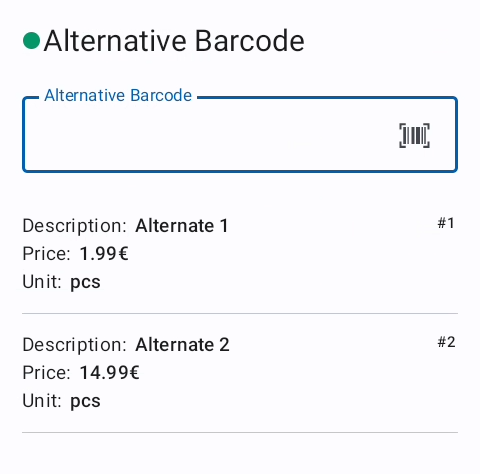
If the generated match contains a field “AlternateMatchCode” which is not empty, the system will split it by comma into a list of options. The first option is a modifier which, when set to 0, sets the following dialog to optional. If it is set to 1 the Alternate Match Code dialog is mandatory. For the usage see Android -> Alternative Barcode
The following values of the list are again splitted into columns which are separated by a equal sign (=). These values will be presented to the user in the dialog.
- The first value of each of these options is the value the field will get if selected. - The second value is the scannable value. If no option is scannable (by leaving the second field empty) the barcode reader is disabled.
- All values following the second value are shown to the user in a table. The first option is interpreted as headline and cannot be chosen. All other options will be listed below where the user can either select them by using the arrows and pressing ENTER once the item of choice is selected, or by scanning it.
The value of the first column will then be processed as if this was the initial value, excepted it is equal.
If the match, fetched by the selected code, again contains data in the column
“AlternateMatchCode”, this procedure starts over again.
Example:
1,==Description=Price=Unit,2085001003227==Alternate 1=1.99€=pcs,2085001003234==Alternate 2=14.99€=pcs